你好,我是朱晔。今天,我来和你说说恼人的时间错乱问题。
在Java 8之前,我们处理日期时间需求时,使用Date、Calender和SimpleDateFormat,来声明时间戳、使用日历处理日期和格式化解析日期时间。但是,这些类的API的缺点比较明显,比如可读性差、易用性差、使用起来冗余繁琐,还有线程安全问题。
因此,Java 8推出了新的日期时间类。每一个类功能明确清晰、类之间协作简单、API定义清晰不踩坑,API功能强大无需借助外部工具类即可完成操作,并且线程安全。
但是,Java 8刚推出的时候,诸如序列化、数据访问等类库都还不支持Java 8的日期时间类型,需要在新老类中来回转换。比如,在业务逻辑层使用LocalDateTime,存入数据库或者返回前端的时候还要切换回Date。因此,很多同学还是选择使用老的日期时间类。
现在几年时间过去了,几乎所有的类库都支持了新日期时间类型,使用起来也不会有来回切换等问题了。但,很多代码中因为还是用的遗留的日期时间类,因此出现了很多时间错乱的错误实践。比如,试图通过随意修改时区,使读取到的数据匹配当前时钟;再比如,试图直接对读取到的数据做加、减几个小时的操作,来“修正数据”。
今天,我就重点与你分析下时间错乱问题背后的原因,看看使用遗留的日期时间类,来处理日期时间初始化、格式化、解析、计算等可能会遇到的问题,以及如何使用新日期时间类来解决。
初始化日期时间
我们先从日期时间的初始化看起。如果要初始化一个2019年12月31日11点12分13秒这样的时间,可以使用下面的两行代码吗?
Date date = new Date(2019, 12, 31, 11, 12, 13);
System.out.println(date);
可以看到,输出的时间是3029年1月31日11点12分13秒:
Sat Jan 31 11:12:13 CST 3920
相信看到这里,你会说这是新手才会犯的低级错误:年应该是和1900的差值,月应该是从0到11而不是从1到12。
Date date = new Date(2019 - 1900, 11, 31, 11, 12, 13);
你说的没错,但更重要的问题是,当有国际化需求时,需要使用Calendar类来初始化时间。
使用Calendar改造之后,初始化时年参数直接使用当前年即可,不过月需要注意是从0到11。当然,你也可以直接使用Calendar.DECEMBER来初始化月份,更不容易犯错。为了说明时区的问题,我分别使用当前时区和纽约时区初始化了两次相同的日期:
Calendar calendar = Calendar.getInstance();
calendar.set(2019, 11, 31, 11, 12, 13);
System.out.println(calendar.getTime());
Calendar calendar2 = Calendar.getInstance(TimeZone.getTimeZone("America/New_York"));
calendar2.set(2019, Calendar.DECEMBER, 31, 11, 12, 13);
System.out.println(calendar2.getTime());
输出显示了两个时间,说明时区产生了作用。但,我们更习惯年/月/日 时:分:秒这样的日期时间格式,对现在输出的日期格式还不满意:
Tue Dec 31 11:12:13 CST 2019
Wed Jan 01 00:12:13 CST 2020
那,时区的问题是怎么回事,又怎么格式化需要输出的日期时间呢?接下来,我就与你逐一分析下这两个问题。
“恼人”的时区问题
我们知道,全球有24个时区,同一个时刻不同时区(比如中国上海和美国纽约)的时间是不一样的。对于需要全球化的项目,如果初始化时间时没有提供时区,那就不是一个真正意义上的时间,只能认为是我看到的当前时间的一个表示。
关于Date类,我们要有两点认识:
- 一是,Date并无时区问题,世界上任何一台计算机使用new Date()初始化得到的时间都一样。因为,Date中保存的是UTC时间,UTC是以原子钟为基础的统一时间,不以太阳参照计时,并无时区划分。
- 二是,Date中保存的是一个时间戳,代表的是从1970年1月1日0点(Epoch时间)到现在的毫秒数。尝试输出Date(0):
System.out.println(new Date(0));
System.out.println(TimeZone.getDefault().getID() + ":" + TimeZone.getDefault().getRawOffset()/3600000);
我得到的是1970年1月1日8点。因为我机器当前的时区是中国上海,相比UTC时差+8小时:
Thu Jan 01 08:00:00 CST 1970
Asia/Shanghai:8
对于国际化(世界各国的人都在使用)的项目,处理好时间和时区问题首先就是要正确保存日期时间。这里有两种保存方式:
- 方式一,以UTC保存,保存的时间没有时区属性,是不涉及时区时间差问题的世界统一时间。我们通常说的时间戳,或Java中的Date类就是用的这种方式,这也是推荐的方式。
- 方式二,以字面量保存,比如年/月/日 时:分:秒,一定要同时保存时区信息。只有有了时区信息,我们才能知道这个字面量时间真正的时间点,否则它只是一个给人看的时间表示,只在当前时区有意义。Calendar是有时区概念的,所以我们通过不同的时区初始化Calendar,得到了不同的时间。
正确保存日期时间之后,就是正确展示,即我们要使用正确的时区,把时间点展示为符合当前时区的时间表示。到这里,我们就能理解为什么会有所谓的“时间错乱”问题了。接下来,我再通过实际案例分析一下,从字面量解析成时间和从时间格式化为字面量这两类问题。
第一类是,对于同一个时间表示,比如2020-01-02 22:00:00,不同时区的人转换成Date会得到不同的时间(时间戳):
String stringDate = "2020-01-02 22:00:00";
SimpleDateFormat inputFormat = new SimpleDateFormat("yyyy-MM-dd HH:mm:ss");
//默认时区解析时间表示
Date date1 = inputFormat.parse(stringDate);
System.out.println(date1 + ":" + date1.getTime());
//纽约时区解析时间表示
inputFormat.setTimeZone(TimeZone.getTimeZone("America/New_York"));
Date date2 = inputFormat.parse(stringDate);
System.out.println(date2 + ":" + date2.getTime());
可以看到,把2020-01-02 22:00:00这样的时间表示,对于当前的上海时区和纽约时区,转化为UTC时间戳是不同的时间:
Thu Jan 02 22:00:00 CST 2020:1577973600000
Fri Jan 03 11:00:00 CST 2020:1578020400000
这正是UTC的意义,并不是时间错乱。对于同一个本地时间的表示,不同时区的人解析得到的UTC时间一定是不同的,反过来不同的本地时间可能对应同一个UTC。
第二类问题是,格式化后出现的错乱,即同一个Date,在不同的时区下格式化得到不同的时间表示。比如,在我的当前时区和纽约时区格式化2020-01-02 22:00:00:
String stringDate = "2020-01-02 22:00:00";
SimpleDateFormat inputFormat = new SimpleDateFormat("yyyy-MM-dd HH:mm:ss");
//同一Date
Date date = inputFormat.parse(stringDate);
//默认时区格式化输出:
System.out.println(new SimpleDateFormat("[yyyy-MM-dd HH:mm:ss Z]").format(date));
//纽约时区格式化输出
TimeZone.setDefault(TimeZone.getTimeZone("America/New_York"));
System.out.println(new SimpleDateFormat("[yyyy-MM-dd HH:mm:ss Z]").format(date));
输出如下,我当前时区的Offset(时差)是+8小时,对于-5小时的纽约,晚上10点对应早上9点:
[2020-01-02 22:00:00 +0800]
[2020-01-02 09:00:00 -0500]
因此,有些时候数据库中相同的时间,由于服务器的时区设置不同,读取到的时间表示不同。这,不是时间错乱,正是时区发挥了作用,因为UTC时间需要根据当前时区解析为正确的本地时间。
所以,要正确处理时区,在于存进去和读出来两方面:存的时候,需要使用正确的当前时区来保存,这样UTC时间才会正确;读的时候,也只有正确设置本地时区,才能把UTC时间转换为正确的当地时间。
Java 8推出了新的时间日期类ZoneId、ZoneOffset、LocalDateTime、ZonedDateTime和DateTimeFormatter,处理时区问题更简单清晰。我们再用这些类配合一个完整的例子,来理解一下时间的解析和展示:
- 首先初始化上海、纽约和东京三个时区。我们可以使用ZoneId.of来初始化一个标准的时区,也可以使用ZoneOffset.ofHours通过一个offset,来初始化一个具有指定时间差的自定义时区。
- 对于日期时间表示,LocalDateTime不带有时区属性,所以命名为本地时区的日期时间;而ZonedDateTime=LocalDateTime+ZoneId,具有时区属性。因此,LocalDateTime只能认为是一个时间表示,ZonedDateTime才是一个有效的时间。在这里我们把2020-01-02 22:00:00这个时间表示,使用东京时区来解析得到一个ZonedDateTime。
- 使用DateTimeFormatter格式化时间的时候,可以直接通过withZone方法直接设置格式化使用的时区。最后,分别以上海、纽约和东京三个时区来格式化这个时间输出:
//一个时间表示
String stringDate = "2020-01-02 22:00:00";
//初始化三个时区
ZoneId timeZoneSH = ZoneId.of("Asia/Shanghai");
ZoneId timeZoneNY = ZoneId.of("America/New_York");
ZoneId timeZoneJST = ZoneOffset.ofHours(9);
//格式化器
DateTimeFormatter dateTimeFormatter = DateTimeFormatter.ofPattern("yyyy-MM-dd HH:mm:ss");
ZonedDateTime date = ZonedDateTime.of(LocalDateTime.parse(stringDate, dateTimeFormatter), timeZoneJST);
//使用DateTimeFormatter格式化时间,可以通过withZone方法直接设置格式化使用的时区
DateTimeFormatter outputFormat = DateTimeFormatter.ofPattern("yyyy-MM-dd HH:mm:ss Z");
System.out.println(timeZoneSH.getId() + outputFormat.withZone(timeZoneSH).format(date));
System.out.println(timeZoneNY.getId() + outputFormat.withZone(timeZoneNY).format(date));
System.out.println(timeZoneJST.getId() + outputFormat.withZone(timeZoneJST).format(date));
可以看到,相同的时区,经过解析存进去和读出来的时间表示是一样的(比如最后一行);而对于不同的时区,比如上海和纽约,最后输出的本地时间不同。+9小时时区的晚上10点,对于上海是+8小时,所以上海本地时间是晚上9点;而对于纽约是-5小时,差14小时,所以是早上8点:
Asia/Shanghai2020-01-02 21:00:00 +0800
America/New_York2020-01-02 08:00:00 -0500
+09:002020-01-02 22:00:00 +0900
到这里,我来小结下。要正确处理国际化时间问题,我推荐使用Java 8的日期时间类,即使用ZonedDateTime保存时间,然后使用设置了ZoneId的DateTimeFormatter配合ZonedDateTime进行时间格式化得到本地时间表示。这样的划分十分清晰、细化,也不容易出错。
接下来,我们继续看看对于日期时间的格式化和解析,使用遗留的SimpleDateFormat,会遇到哪些问题。
日期时间格式化和解析
每到年底,就有很多开发同学踩时间格式化的坑,比如“这明明是一个2019年的日期,怎么使用SimpleDateFormat格式化后就提前跨年了”。我们来重现一下这个问题。
初始化一个Calendar,设置日期时间为2019年12月29日,使用大写的YYYY来初始化SimpleDateFormat:
Locale.setDefault(Locale.SIMPLIFIED_CHINESE);
System.out.println("defaultLocale:" + Locale.getDefault());
Calendar calendar = Calendar.getInstance();
calendar.set(2019, Calendar.DECEMBER, 29,0,0,0);
SimpleDateFormat YYYY = new SimpleDateFormat("YYYY-MM-dd");
System.out.println("格式化: " + YYYY.format(calendar.getTime()));
System.out.println("weekYear:" + calendar.getWeekYear());
System.out.println("firstDayOfWeek:" + calendar.getFirstDayOfWeek());
System.out.println("minimalDaysInFirstWeek:" + calendar.getMinimalDaysInFirstWeek());
得到的输出却是2020年12月29日:
defaultLocale:zh_CN
格式化: 2020-12-29
weekYear:2020
firstDayOfWeek:1
minimalDaysInFirstWeek:1
出现这个问题的原因在于,这位同学混淆了SimpleDateFormat的各种格式化模式。JDK的文档中有说明:小写y是年,而大写Y是week year,也就是所在的周属于哪一年。
一年第一周的判断方式是,从getFirstDayOfWeek()开始,完整的7天,并且包含那一年至少getMinimalDaysInFirstWeek()天。这个计算方式和区域相关,对于当前zh_CN区域来说,2020年第一周的条件是,从周日开始的完整7天,2020年包含1天即可。显然,2019年12月29日周日到2020年1月4日周六是2020年第一周,得出的week year就是2020年。
如果把区域改为法国:
Locale.setDefault(Locale.FRANCE);
那么week yeay就还是2019年,因为一周的第一天从周一开始算,2020年的第一周是2019年12月30日周一开始,29日还是属于去年:
defaultLocale:fr_FR
格式化: 2019-12-29
weekYear:2019
firstDayOfWeek:2
minimalDaysInFirstWeek:4
这个案例告诉我们,没有特殊需求,针对年份的日期格式化,应该一律使用 “y” 而非 “Y”。
除了格式化表达式容易踩坑外,SimpleDateFormat还有两个著名的坑。
第一个坑是,定义的static的SimpleDateFormat可能会出现线程安全问题。比如像这样,使用一个100线程的线程池,循环20次把时间格式化任务提交到线程池处理,每个任务中又循环10次解析2020-01-01 11:12:13这样一个时间表示:
ExecutorService threadPool = Executors.newFixedThreadPool(100);
for (int i = 0; i < 20; i++) {
    //提交20个并发解析时间的任务到线程池,模拟并发环境
    threadPool.execute(() -> {
        for (int j = 0; j < 10; j++) {
            try {
                System.out.println(simpleDateFormat.parse("2020-01-01 11:12:13"));
            } catch (ParseException e) {
                e.printStackTrace();
            }
        }
    });
}
threadPool.shutdown();
threadPool.awaitTermination(1, TimeUnit.HOURS);
运行程序后大量报错,且没有报错的输出结果也不正常,比如2020年解析成了1212年:
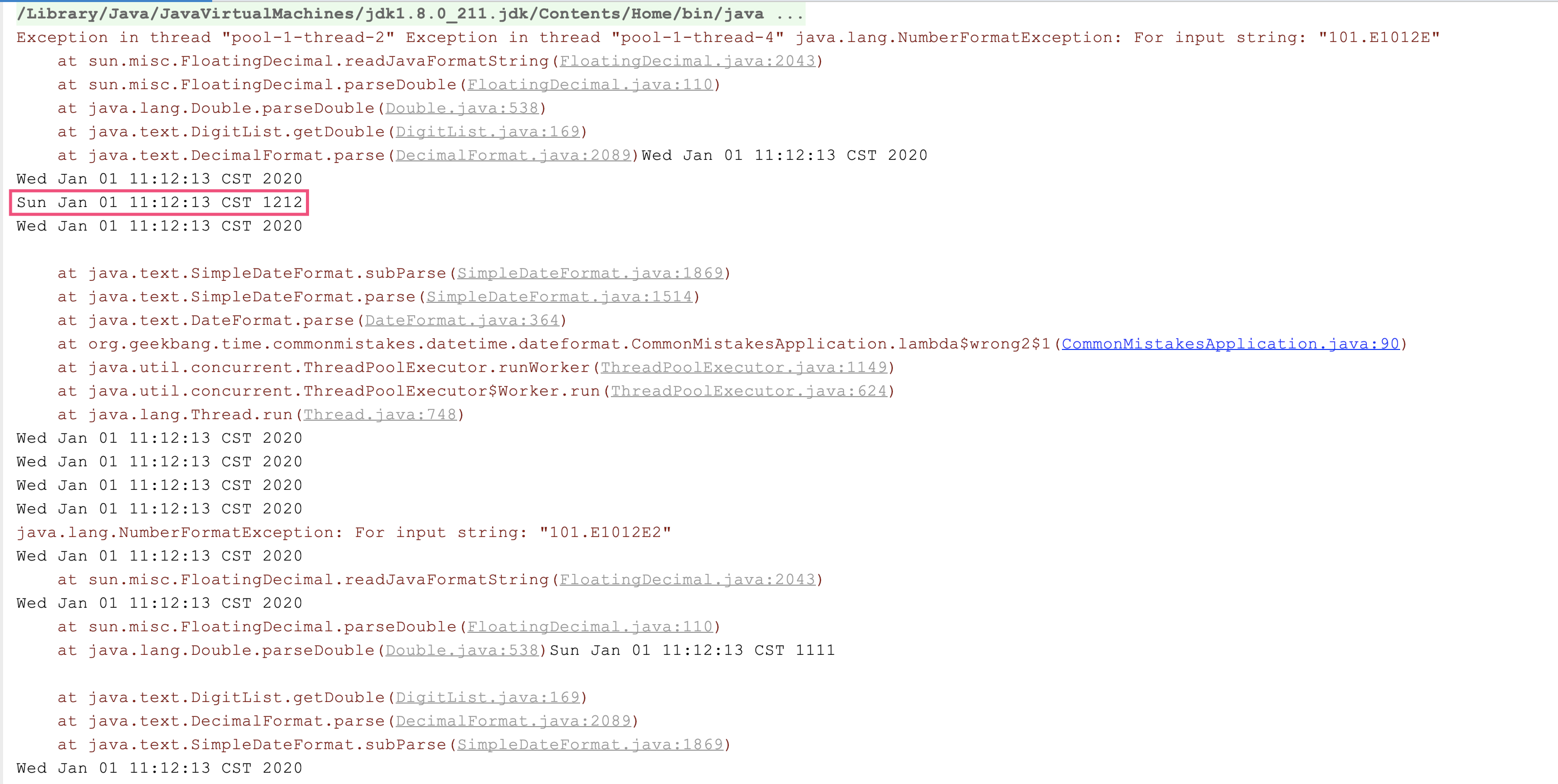
SimpleDateFormat的作用是定义解析和格式化日期时间的模式。这,看起来这是一次性的工作,应该复用,但它的解析和格式化操作是非线程安全的。我们来分析一下相关源码:
- SimpleDateFormat继承了DateFormat,DateFormat有一个字段Calendar;
- SimpleDateFormat的parse方法调用CalendarBuilder的establish方法,来构建Calendar;
- establish方法内部先清空Calendar再构建Calendar,整个操作没有加锁。
显然,如果多线程池调用parse方法,也就意味着多线程在并发操作一个Calendar,可能会产生一个线程还没来得及处理Calendar就被另一个线程清空了的情况:
public abstract class DateFormat extends Format {
    protected Calendar calendar;
}
public class SimpleDateFormat extends DateFormat {
    @Override
    public Date parse(String text, ParsePosition pos)
    {
        CalendarBuilder calb = new CalendarBuilder();
		parsedDate = calb.establish(calendar).getTime();
        return parsedDate;
    }
}

class CalendarBuilder {
	Calendar establish(Calendar cal) {
       	...
        cal.clear();//清空

        for (int stamp = MINIMUM_USER_STAMP; stamp < nextStamp; stamp++) {
            for (int index = 0; index <= maxFieldIndex; index++) {
                if (field[index] == stamp) {
                    cal.set(index, field[MAX_FIELD + index]);//构建
                    break;
                }
            }
        }
        return cal;
    }
}
format方法也类似,你可以自己分析。因此只能在同一个线程复用SimpleDateFormat,比较好的解决方式是,通过ThreadLocal来存放SimpleDateFormat:
private static ThreadLocal<SimpleDateFormat> threadSafeSimpleDateFormat = ThreadLocal.withInitial(() -> new SimpleDateFormat("yyyy-MM-dd HH:mm:ss"));
第二个坑是,当需要解析的字符串和格式不匹配的时候,SimpleDateFormat表现得很宽容,还是能得到结果。比如,我们期望使用yyyyMM来解析20160901字符串:
String dateString = "20160901";
SimpleDateFormat dateFormat = new SimpleDateFormat("yyyyMM");
System.out.println("result:" + dateFormat.parse(dateString));
居然输出了2091年1月1日,原因是把0901当成了月份,相当于75年:
result:Mon Jan 01 00:00:00 CST 2091
对于SimpleDateFormat的这三个坑,我们使用Java 8中的DateTimeFormatter就可以避过去。首先,使用DateTimeFormatterBuilder来定义格式化字符串,不用去记忆使用大写的Y还是小写的Y,大写的M还是小写的m:
private static DateTimeFormatter dateTimeFormatter = new DateTimeFormatterBuilder()
        .appendValue(ChronoField.YEAR) //年
        .appendLiteral("/")
        .appendValue(ChronoField.MONTH_OF_YEAR) //月
        .appendLiteral("/")
        .appendValue(ChronoField.DAY_OF_MONTH) //日
        .appendLiteral(" ")
        .appendValue(ChronoField.HOUR_OF_DAY) //时
        .appendLiteral(":")
        .appendValue(ChronoField.MINUTE_OF_HOUR) //分
        .appendLiteral(":")
        .appendValue(ChronoField.SECOND_OF_MINUTE) //秒
        .appendLiteral(".")
        .appendValue(ChronoField.MILLI_OF_SECOND) //毫秒
        .toFormatter();
其次,DateTimeFormatter是线程安全的,可以定义为static使用;最后,DateTimeFormatter的解析比较严格,需要解析的字符串和格式不匹配时,会直接报错,而不会把0901解析为月份。我们测试一下:
//使用刚才定义的DateTimeFormatterBuilder构建的DateTimeFormatter来解析这个时间
LocalDateTime localDateTime = LocalDateTime.parse("2020/1/2 12:34:56.789", dateTimeFormatter);
//解析成功
System.out.println(localDateTime.format(dateTimeFormatter));
//使用yyyyMM格式解析20160901是否可以成功呢?
String dt = "20160901";
DateTimeFormatter dateTimeFormatter = DateTimeFormatter.ofPattern("yyyyMM");
System.out.println("result:" + dateTimeFormatter.parse(dt));
输出日志如下:
2020/1/2 12:34:56.789
Exception in thread "main" java.time.format.DateTimeParseException: Text '20160901' could not be parsed at index 0
	at java.time.format.DateTimeFormatter.parseResolved0(DateTimeFormatter.java:1949)
	at java.time.format.DateTimeFormatter.parse(DateTimeFormatter.java:1777)
	at org.geekbang.time.commonmistakes.datetime.dateformat.CommonMistakesApplication.better(CommonMistakesApplication.java:80)
	at org.geekbang.time.commonmistakes.datetime.dateformat.CommonMistakesApplication.main(CommonMistakesApplication.java:41)
到这里我们可以发现,使用Java 8中的DateTimeFormatter进行日期时间的格式化和解析,显然更让人放心。那么,对于日期时间的运算,使用Java 8中的日期时间类会不会更简单呢?
日期时间的计算
关于日期时间的计算,我先和你说一个常踩的坑。有些同学喜欢直接使用时间戳进行时间计算,比如希望得到当前时间之后30天的时间,会这么写代码:直接把new Date().getTime方法得到的时间戳加30天对应的毫秒数,也就是30天*1000毫秒*3600秒*24小时:
Date today = new Date();
Date nextMonth = new Date(today.getTime() + 30 * 1000 * 60 * 60 * 24);
System.out.println(today);
System.out.println(nextMonth);
得到的日期居然比当前日期还要早,根本不是晚30天的时间:
Sat Feb 01 14:17:41 CST 2020
Sun Jan 12 21:14:54 CST 2020
出现这个问题,其实是因为int发生了溢出。修复方式就是把30改为30L,让其成为一个long:
Date today = new Date();
Date nextMonth = new Date(today.getTime() + 30L * 1000 * 60 * 60 * 24);
System.out.println(today);
System.out.println(nextMonth);
这样就可以得到正确结果了:
Sat Feb 01 14:17:41 CST 2020
Mon Mar 02 14:17:41 CST 2020
不难发现,手动在时间戳上进行计算操作的方式非常容易出错。对于Java 8之前的代码,我更建议使用Calendar:
Calendar c = Calendar.getInstance();
c.setTime(new Date());
c.add(Calendar.DAY_OF_MONTH, 30);
System.out.println(c.getTime());
使用Java 8的日期时间类型,可以直接进行各种计算,更加简洁和方便:
LocalDateTime localDateTime = LocalDateTime.now();
System.out.println(localDateTime.plusDays(30));
并且,对日期时间做计算操作,Java 8日期时间API会比Calendar功能强大很多。
第一,可以使用各种minus和plus方法直接对日期进行加减操作,比如如下代码实现了减一天和加一天,以及减一个月和加一个月:
System.out.println("//测试操作日期");
System.out.println(LocalDate.now()
        .minus(Period.ofDays(1))
        .plus(1, ChronoUnit.DAYS)
        .minusMonths(1)
        .plus(Period.ofMonths(1)));
可以得到:
//测试操作日期
2020-02-01
第二,还可以通过with方法进行快捷时间调节,比如:
- 使用TemporalAdjusters.firstDayOfMonth得到当前月的第一天;
- 使用TemporalAdjusters.firstDayOfYear()得到当前年的第一天;
- 使用TemporalAdjusters.previous(DayOfWeek.SATURDAY)得到上一个周六;
- 使用TemporalAdjusters.lastInMonth(DayOfWeek.FRIDAY)得到本月最后一个周五。
System.out.println("//本月的第一天");
System.out.println(LocalDate.now().with(TemporalAdjusters.firstDayOfMonth()));

System.out.println("//今年的程序员日");
System.out.println(LocalDate.now().with(TemporalAdjusters.firstDayOfYear()).plusDays(255));

System.out.println("//今天之前的一个周六");
System.out.println(LocalDate.now().with(TemporalAdjusters.previous(DayOfWeek.SATURDAY)));

System.out.println("//本月最后一个工作日");
System.out.println(LocalDate.now().with(TemporalAdjusters.lastInMonth(DayOfWeek.FRIDAY)));
输出如下:
//本月的第一天
2020-02-01
//今年的程序员日
2020-09-12
//今天之前的一个周六
2020-01-25
//本月最后一个工作日
2020-02-28
第三,可以直接使用lambda表达式进行自定义的时间调整。比如,为当前时间增加100天以内的随机天数:
System.out.println(LocalDate.now().with(temporal -> temporal.plus(ThreadLocalRandom.current().nextInt(100), ChronoUnit.DAYS)));
得到:
2020-03-15
除了计算外,还可以判断日期是否符合某个条件。比如,自定义函数,判断指定日期是否是家庭成员的生日:
public static Boolean isFamilyBirthday(TemporalAccessor date) {
    int month = date.get(MONTH_OF_YEAR);
    int day = date.get(DAY_OF_MONTH);
    if (month == Month.FEBRUARY.getValue() && day == 17)
        return Boolean.TRUE;
    if (month == Month.SEPTEMBER.getValue() && day == 21)
        return Boolean.TRUE;
    if (month == Month.MAY.getValue() && day == 22)
        return Boolean.TRUE;
    return Boolean.FALSE;
}
然后,使用query方法查询是否匹配条件:
System.out.println("//查询是否是今天要举办生日");
System.out.println(LocalDate.now().query(CommonMistakesApplication::isFamilyBirthday));
使用Java 8操作和计算日期时间虽然方便,但计算两个日期差时可能会踩坑:Java 8中有一个专门的类Period定义了日期间隔,通过Period.between得到了两个LocalDate的差,返回的是两个日期差几年零几月零几天。如果希望得知两个日期之间差几天,直接调用Period的getDays()方法得到的只是最后的“零几天”,而不是算总的间隔天数。
比如,计算2019年12月12日和2019年10月1日的日期间隔,很明显日期差是2个月零11天,但获取getDays方法得到的结果只是11天,而不是72天:
System.out.println("//计算日期差");
LocalDate today = LocalDate.of(2019, 12, 12);
LocalDate specifyDate = LocalDate.of(2019, 10, 1);
System.out.println(Period.between(specifyDate, today).getDays());
System.out.println(Period.between(specifyDate, today));
System.out.println(ChronoUnit.DAYS.between(specifyDate, today));
可以使用ChronoUnit.DAYS.between解决这个问题:
//计算日期差
11
P2M11D
72
从日期时间的时区到格式化再到计算,你是不是体会到Java 8日期时间类的强大了呢?
重点回顾
今天,我和你一起看了日期时间的初始化、时区、格式化、解析和计算的问题。我们看到,使用Java 8中的日期时间包Java.time的类进行各种操作,会比使用遗留的Date、Calender和SimpleDateFormat更简单、清晰,功能也更丰富、坑也比较少。
如果有条件的话,我还是建议全面改为使用Java 8的日期时间类型。我把Java 8前后的日期时间类型,汇总到了一张思维导图上,图中箭头代表的是新老类型在概念上等价的类型:
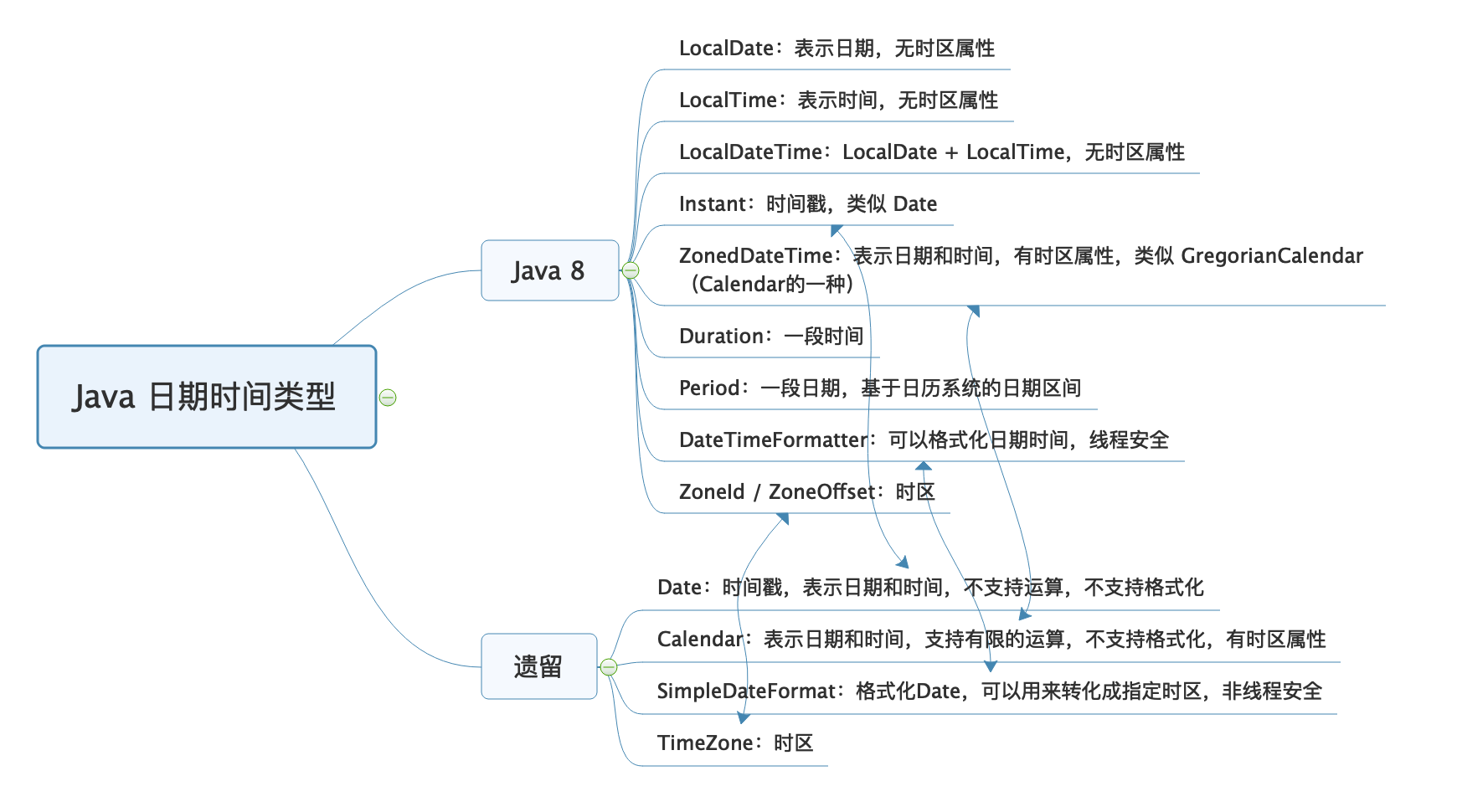
这里有个误区是,认为java.util.Date类似于新API中的LocalDateTime。其实不是,虽然它们都没有时区概念,但java.util.Date类是因为使用UTC表示,所以没有时区概念,其本质是时间戳;而LocalDateTime,严格上可以认为是一个日期时间的表示,而不是一个时间点。
因此,在把Date转换为LocalDateTime的时候,需要通过Date的toInstant方法得到一个UTC时间戳进行转换,并需要提供当前的时区,这样才能把UTC时间转换为本地日期时间(的表示)。反过来,把LocalDateTime的时间表示转换为Date时,也需要提供时区,用于指定是哪个时区的时间表示,也就是先通过atZone方法把LocalDateTime转换为ZonedDateTime,然后才能获得UTC时间戳:
Date in = new Date();
LocalDateTime ldt = LocalDateTime.ofInstant(in.toInstant(), ZoneId.systemDefault());
Date out = Date.from(ldt.atZone(ZoneId.systemDefault()).toInstant());
很多同学说使用新API很麻烦,还需要考虑时区的概念,一点都不简洁。但我通过这篇文章要和你说的是,并不是因为API需要设计得这么繁琐,而是UTC时间要变为当地时间,必须考虑时区。
今天用到的代码,我都放在了GitHub上,你可以点击这个链接查看。
思考与讨论
- 我今天多次强调Date是一个时间戳,是UTC时间、没有时区概念,为什么调用其toString方法会输出类似CST之类的时区字样呢?
- 日期时间数据始终要保存到数据库中,MySQL中有两种数据类型datetime和timestamp可以用来保存日期时间。你能说说它们的区别吗,它们是否包含时区信息呢?
对于日期和时间,你还遇到过什么坑吗?我是朱晔,欢迎在评论区与我留言分享你的想法,也欢迎你把今天的内容分享给你的朋友或同事,一起交流。
精选留言
2020-04-16 13:48:37
第一个:
Date的toString()方法处理的,同String中有BaseCalendar.Date date = normalize();
而normalize中进行这样处理cdate = (BaseCalendar.Date) cal.getCalendarDate(fastTime,TimeZone.getDefaultRef();
因此其实是获取当前的默认时区的。
第二个:
从下面几个维度进行区分:
占用空间:datetime:8字节。timestamp 4字节
表示范围:datetime '1000-01-01 00:00:00.000000' to '9999-12-31 23:59:59.999999'
timestamp '1970-01-01 00:00:01.000000' to '2038-01-19 03:14:07.999999'
时区:timestamp 只占 4 个字节,而且是以utc的格式储存, 它会自动检索当前时区并进行转换。
datetime以 8 个字节储存,不会进行时区的检索.
也就是说,对于timestamp来说,如果储存时的时区和检索时的时区不一样,那么拿出来的数据也不一样。对于datetime来说,存什么拿到的就是什么。
更新:timestamp NOT NULL DEFAULT CURRENT_TIMESTAMP ON UPDATE CURRENT_TIMESTAMP;
这个特性是自动初始化和自动更新(Automatic Initialization and Updating)。
自动更新指的是如果修改了其它字段,则该字段的值将自动更新为当前系统时间。
它与“explicit_defaults_for_timestamp”参数有关。
By default, the first TIMESTAMP column has both DEFAULT CURRENT_TIMESTAMP and ON UPDATE CURRENT_TIMESTAMP if neither is specified explicitly。
很多时候,这并不是我们想要的,如何禁用呢?
1. 将“explicit_defaults_for_timestamp”的值设置为ON。
2. “explicit_defaults_for_timestamp”的值依旧是OFF,也有两种方法可以禁用
1> 用DEFAULT子句该该列指定一个默认值
2> 为该列指定NULL属性。
在MySQL 5.6.5版本之前,Automatic Initialization and Updating只适用于TIMESTAMP,而且一张表中,最多允许一个TIMESTAMP字段采用该特性。从MySQL 5.6.5开始,Automatic Initialization and Updating同时适用于TIMESTAMP和DATETIME,且不限制数量。
2020-04-16 09:53:16
时间戳有几个优势:
1,便于比较和排序,无论数据库还是后台业务中都是如此。
2,也比较便于计算,虽然文中提到了Long的问题,但是,我认为L的问题的根本在于Long类型的理解,不是时间戳这个业务的问题。对Long的基础比较好了之后,也就足以应对计算中的问题了。
3,多端统一,现在提供给前端的很多服务都采用直接转换好年月日的字符串了,但是有时候,前端需要对时间进行比较的时候还是需要额外转化,会很麻烦。而且不利于格式化。时间戳的话就避免了这个问题,自己进行计算,自己格式化。前端自己随便玩。
2020-04-16 08:49:09
2020-04-16 09:42:44
根本原因在于toString的源代码:
sb.append(zi.getDisplayName(date.isDaylightTime(), TimeZone.SHORT, Locale.US)); // zzz 这一行。
Date的toString实际上,是新建一个StringBuilder,然后根据Date对象里的年月日周,将其格式化。
格式化过程中,似乎会获取系统默认的时区,如果取不到系统默认时区,就使用GMT。
为了测试我的猜想,我尝试更改本机时区,结果输出:
Wed Apr 15 21:40:10 EDT 2020
相比较正常自动时区
Thu Apr 16 09:41:31 CST 2020
基本与我的猜测一致。
2020-04-16 10:13:09
2020-05-11 10:25:07
String stringDate = "2020-05-02 22:00:00";
SimpleDateFormat inputFormat = new SimpleDateFormat("yyyy-MM-dd HH:mm:ss");
//同一Date
Date date = inputFormat.parse(stringDate);
//默认时区格式化输出:
System.out.println(new SimpleDateFormat("[yyyy-MM-dd HH:mm:ss Z]").format(date));
//纽约时区格式化输出
TimeZone.setDefault(TimeZone.getTimeZone("America/New_York"));
System.out.println(new SimpleDateFormat("[yyyy-MM-dd HH:mm:ss Z]").format(date));
2020-06-03 19:14:08
后面突然想起老师这篇文章。。。完全是坑二的重现。因为是jdk6所以选择了去掉static解决,每次都会新建一个对象
2020-04-16 12:34:08
首先,为了让docker容器的时间格式和宿主机一致,可以在environment中添加TZ: Asia/Shanghai。
实验发现,切换mysql的TIME_ZONE到“america/new_york”后,发现datetime格式字段不发生变化,而timestamp格式会换算成纽约时区时间,所以timestamp格式的日期保存了时区信息,而datetime没有。
感觉在业务场景中,有可能出现服务器或容器系统时间并未设置时区,导致保存的数据并不是我们想要的。因此,是不是更推荐使用timestamp格式来保存日期,避免这种情况发生呢?
2020-04-16 09:45:55
说实话,数据库相关知识是我的弱项。
查了一下,大概是TIMESTAMP包含了时区信息,而DATETIME不包含。另外有一个是,我印象中5.7之后的mysql版本,最多只能有一个TIMESTAMP的字段。这也算是个区别吧。
2020-04-22 18:05:47
2020-04-16 13:20:31
思考题1
Date#toString方法中,会将当前时间转化为BaseCalendar.Date类,这个类有一个Zone属性,在toString的时候会被追加到字符串中(默认是GMT)
思考题2
datetime占用8字节,不受时区影响,表示范围'1000-01-01 00:00:00' to '9999-12-31 23:59:59'
timestamp占用4字节,受时区影响,表示范围'1970-01-01 00:00:01' to '2038-01-19 03:14:07',若插入null会自动转化为当前时间
2020-04-16 08:51:19
2020-08-21 08:20:41
2020-07-22 14:21:05
2020-06-19 15:47:22
Date和Instant都可以根据时间戳来创建,其中并不包含时区信息,因此并不会出现所谓的时间错误。
因此在保存数据时,都可以通过Long型来保存时间戳信息。
当需要实现日期格式化时,通过将时间戳转换为对应的时区的时间进行显示。
2. 测试Demo
public class DateTest {
@Test
public void timeStampTest() {
Date date = new Date();
Instant instant = date.toInstant();
assertEquals(date.getTime(), instant.toEpochMilli());
ZoneId shZoneId = ZoneId.of("Asia/Shanghai");
ZoneId cgZoneId = ZoneId.of("America/Chicago");
LocalDateTime shLocalDateTime = LocalDateTime.ofInstant(instant, shZoneId);
LocalDateTime cgLocalDateTime = LocalDateTime.ofInstant(instant, cgZoneId);
assertEquals(shLocalDateTime.getSecond(), cgLocalDateTime.getSecond());
assertEquals(Math.abs(shLocalDateTime.getHour() - cgLocalDateTime.getHour()), 13);
ZonedDateTime shZonedDateTime = ZonedDateTime.of(shLocalDateTime, shZoneId);
ZonedDateTime cgZonedDateTime = ZonedDateTime.of(cgLocalDateTime, cgZoneId);
assertEquals(shLocalDateTime.getSecond(), cgZonedDateTime.getSecond());
DateTimeFormatter dateTimeFormatter = DateTimeFormatter.ofPattern("yyyy-MM-dd HH:mm:ss");
String shDateTimeStr = dateTimeFormatter.format(shZonedDateTime);
String cgDateTimeStr = dateTimeFormatter.format(cgZonedDateTime);
assertFalse(shDateTimeStr.equals(cgDateTimeStr));
}
}
2020-04-19 16:54:02
**
* 获取本周一开始时间
* @return
*/
public static String getFirstTimeByWeek() {
LocalDateTime currentTime = LocalDateTime.now();
LocalDateTime weekStartTime = currentTime.with(TemporalAdjusters.previous(DayOfWeek.SUNDAY)).plusDays(1).truncatedTo(ChronoUnit.DAYS);
//求出这个日期所在周的星期一
return weekStartTime.format(df);
}
/**
* 获取本周一截止时间
* @return
*/
public static String getLastTimeByWeek() {
LocalDateTime currentTime = LocalDateTime.now();
LocalDateTime weekEndTime = currentTime.with(TemporalAdjusters.next(DayOfWeek.MONDAY)).minusDays(1);
//求出这个日期所在周的星期一
return weekEndTime.format(df);
}
/**
* 获取当月第一天其实时间
* @return
*/
public static String getFirstTimeByMonth() {
LocalDateTime currentTime = LocalDateTime.now();
LocalDateTime monthStartDate = currentTime.withDayOfMonth(1).truncatedTo(ChronoUnit.DAYS);
return monthStartDate.format(df);
}
/**
* 获取当月最后一天截止时间
* @return
*/
public static String getLastTimeByMonth() {
LocalDateTime currentTime = LocalDateTime.now();
LocalDateTime monthEndDate = currentTime.plusMonths(1L).withDayOfMonth(1).truncatedTo(ChronoUnit.DAYS).plus(-1L, ChronoUnit.MILLIS);
return monthEndDate.format(df);
}
获取本周日截止时间的时候总是获取不到时分秒的那部分:23:59:59
2020-04-18 19:53:14
2022-12-08 11:09:30
2022-10-19 17:02:13
JDK8的LocalDate和joda.time的LocalDate哪个更适合用在项目里?
2022-01-30 08:14:36