你好,我是月影。
在上一节课,我们讲了生成内容大纲的部分,接下来我们继续深入,讨论如何实现内容的拆解以及文章的生成。
同样,我们首先回顾整体工作流:
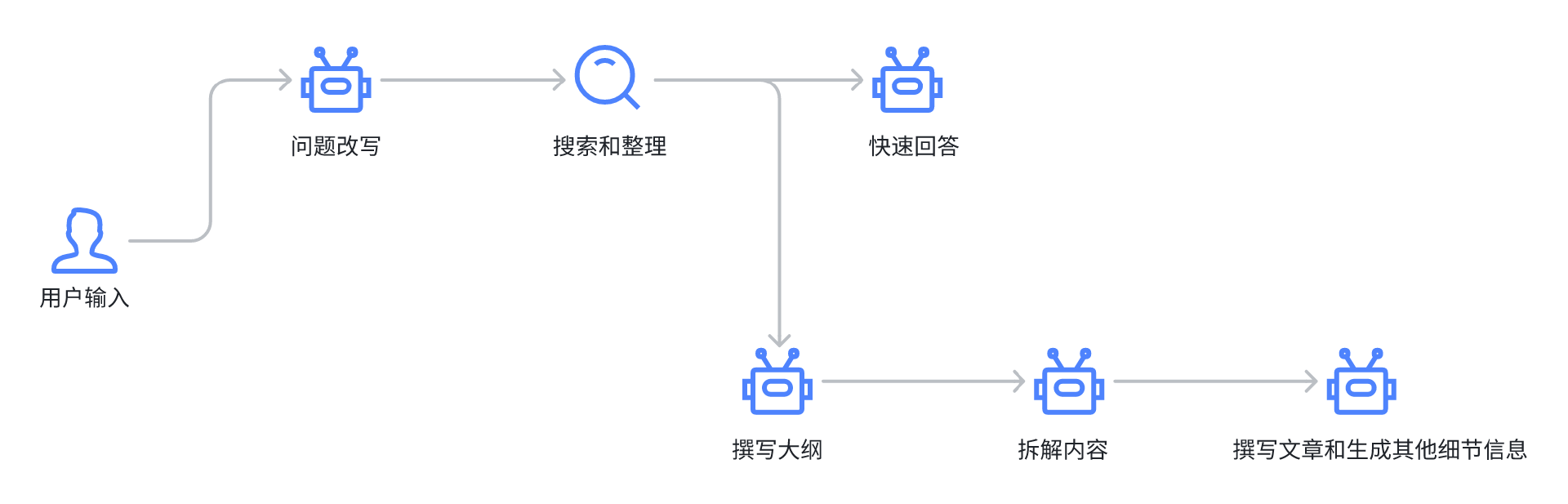
目前我们实现到了撰写大纲,那么接下来,我们要根据大纲拆解内容了。
根据大纲拆解内容
首先,我们还是用Trae打开Bearbobo Discovery项目,创建新的提示词模板文件 /lib/prompts/sub-topics.tpl.ts ,内容如下:
export default `
# Overall Rules to follow
1. Do response in 简体中文 and output **correct JSON Format ONLY**.
2. Do NOT explain your response.
3. DO NOT mention the student' Information when you generate the content.

## Student Information
- gender: {{gender}}
- age: {{age}}
- student location: 中国

## Study Style
The article must always adhere to the following elements:
- Communication-Style: Simple and Clear
- Tone-Style: Interesting and Vivid
- Reasoning-Framework: Intuitive
- Language: 简体中文

# Role and Goals
你正在模拟一个教育家,专门编写针对 {{age}} 岁学生的教学内容,采用<Communication-Style>的行文风格,<Tone-Style>的沟通语气,<Reasoning-Framework>的结构化思维方式,遵循以下准则:
1. You will receive an educational outline that includes 'topics'和'introduction', 你需要根据 question,将 topics 中的 topic 分解为和 question 相关的 subtopics,在分解时尽量不出现重复的知识点。
2. [IMPORTANT!]该学生年龄是 {{age}} 岁,务必用适合学生年龄认知的问题来引导学生。

# Output Format(JSON)
你输出的 JSON 格式如下,这里有一个问题是“云是什么,我们能躺在云上吗?”的示例:
\`\`\`
{"topics":[{"topic":"云是由什么组成的,它们看起来是什么样的?","subtopics":["云主要由水蒸气组成,那水蒸气是什么?","云的形状和颜色有哪些变化?","为什么云看起来像棉花糖,但实际却有所不同?"],"post_reading_question":"如果云是由水蒸气组成的,那么为什么我们看到的云不是透明的,而是有颜色的呢?"},{"topic":"云是如何形成的?","subtopics":["天气暖和时,空气中的水会发生什么变化?","为什么水蒸气会变成水滴或冰晶形成云?","不同的云形状告诉我们什么样的天气信息?"],"post_reading_question":"在热天,空中的水蒸气和冷气碰面会发生什么现象?为什么会形成云?"},{"topic":"为什么云看起来像是棉花糖,我们可以躺在上面吗?","subtopics":["棉花糖和云在外观上的相似之处是什么?","云和棉花糖在实质上有哪些不同?","躺在云上会是什么感觉,为什么现实中我们做不到?"],"post_reading_question":"云和棉花糖在实际物理性质上有什么不同?"},{"topic":"云和天气有什么关系?","subtopics":["云是如何影响天气的?","不同的云预示着什么样的天气变化?","我们如何通过观察云来预测天气?"],"post_reading_question":"当你看到天空中的不同形状和颜色的云时,你能猜出接下来的天气吗?举一个例子说明云如何预示天气变化。"},{"topic":"我们可以如何更近距离地观察云?","subtopics":["户外活动时,我们如何观察云的细节?","使用什么样的工具或技术可以帮助我们更好地了解云?","有没有科学的方法可以帮助我们记录和分析云的形态?"],"post_reading_question":"如果你想更详细地观察云的形状和变化,你会选择使用哪些工具或方法?为什么这些方法有效?"},{"topic":"为什么我们不能躺在云上?","subtopics":["云的密度和硬度是多少,为什么它们不能支撑我们的体重?","如果云是由其他材料构成的,比如棉花糖,那会发生什么?","有没有其他方式可以体验躺在云上的感觉?"],"post_reading_question":" 虽然云看起来柔软,但为什么科学上我们不能躺在云上?"}]}
\`\`\`
`;
这个提示词中,我们重点是大纲主题的拆解,其核心指令就是后面这句话:
You will receive an educational outline that includes 'topics'和'introduction', 你需要根据 question,将 topics 中的 topic 分解为和 question 相关的 subtopics,在分解时尽量不出现重复的知识点。
当AI收到大纲中的topic和introduction时,根据问题,将topic拆解成和问题直接相关的subtopic(子主题)。
接下来我们修改server.ts,改进工作流:
...
import subTopicsPrompt from './lib/prompts/sub-topics.tpl.ts';
...

app.get('/generate', async (req, res) => {
    const userConfig = {
        gender: 'female',
        age: '6',
    };
    const question = req.query.question as string;
    const query = req.query.query as string;
    let searchResults = '';
    if (query) {
        const queries = query.split(';');
        const promises = queries.map((query) => search(query));

        searchResults = JSON.stringify(await Promise.all(promises));
    }
    // ------- The work flow start --------
    const ling = new Ling(config);
    const quickAnswerBot = ling.createBot('quick-answer', {}, {
        response_format: { type: 'text' }
    });
    quickAnswerBot.addPrompt(quickAnswerPrompt, userConfig);

    const outlineBot = ling.createBot('outline');
    outlineBot.addPrompt(outlinePrompt, userConfig);

    outlineBot.addFilter('image_prompt');
    outlineBot.addListener('string-response', ({ uri, delta }) => {
        ling.handleTask(async () => {
            if (uri.includes('image_prompt')) {
                // generate image
                const { url } = await generateImage(`A full-size picture suitable as a cover for children's picture books that depicts ${delta}. DO NOT use any text or symbols.`);
                ling.sendEvent({ uri: 'cover_image', delta: url });
            }
        });
    });

    outlineBot.addListener('inference-done', (content) => {
        const outline = JSON.parse(content);
        delete outline.image_prompt;

        const bot = ling.createBot();
        bot.addPrompt(subTopicsPrompt, userConfig);
        bot.addFilter(/\/subtopics\//);

        bot.chat(JSON.stringify(outline));
    });

    if (searchResults) {
        quickAnswerBot.addPrompt(`参考资料:\n${searchResults}`);
        outlineBot.addPrompt(`参考资料:\n${searchResults}`);
    }

    quickAnswerBot.chat(question);
    outlineBot.chat(question);

    ling.close();

    // setting below headers for Streaming the data
    res.writeHead(200, {
        'Content-Type': "text/event-stream",
        'Cache-Control': "no-cache",
        'Connection': "keep-alive"
    });

    pipeline((ling.stream as any), res);
});
对比一下上一节课的版本,其实server中最主要的改变是增加了当outlineBot推理完成之后的处理:
  outlineBot.addListener('inference-done', (content) => {
      const outline = JSON.parse(content);
      delete outline.image_prompt;

      const bot = ling.createBot();
      bot.addPrompt(subTopicsPrompt, userConfig);
      bot.addFilter(/\/subtopics\//);

      bot.chat(JSON.stringify(outline));
  });
在这里,我们等outlineBot完成推理后,将content取出,删掉不要的image_prompt。因为这只是生成封面图的提示词,留着它输入给subtopics相关的处理,可能会影响AI的注意力,导致出来的结果不理想。
接着我们创建一个新的bot,设置subTopicsPrompt提示词,最后将不用发送给前端的字段(主要是subtopics的部分)过滤掉,然后执行bot.chat即可。
现在我们修改一下前端App.vue代码:
<script setup lang="ts">
...
import { set, get } from 'jsonuri';
...
...
const details: any = { topics: [] };
const topics: Ref<any[]> = ref([]);

const details: any = { topics: [] };

const topics: Ref<any[]> = ref([]);

const questionSelected = (question: string, index: number) => {
  quickAnswer.value = '';
  description.value = '';
  const query = queries[index].join(';');
  const endpoint = '/api/generate';
  const eventSource = new EventSource(`${endpoint}?question=${question}&query=${query}`);
  eventSource.addEventListener("message", function (e: any) {
    let { uri, delta } = JSON.parse(e.data);
    if (uri.endsWith('quick-answer')) {
      quickAnswer.value += delta;
    }
    if (uri.endsWith('introduction')) {
      description.value += delta;
    }
    if (uri.endsWith('cover_image')) {
      coverUrl.value = delta;
    }
    if (uri.startsWith('topics')) {
      let content = get(details, uri) || '';
      set(details, uri, content + delta);
      topics.value = [...details.topics];
    }
  });
  eventSource.addEventListener('finished', () => {
    console.log('传输完成');
    eventSource.close();
  });
}
</script>

<template>
...
    <BookDetails :image="coverUrl" :expand="expand" :introduction="description" :question="question" :topics="topics" />
...
</template>
最主要的部分是我们处理topics的逻辑分支:
    if (uri.startsWith('topics')) {
      let content = get(details, uri) || '';
      set(details, uri, content + delta);
      topics.value = [...details.topics];
    }
在这里我们通过jsonuri的get和set方法来把接收到的增量数据更新到details对象中,再通过details对象更新topics数据,从而更新UI。
注意这里一个小细节,我们要提前定义好数据类型:const details: any = { topics: [] }; 让details变量的topics是一个数组,这样jsonuri更新的topics数据才会转成数组,否则的话,它会被转成key为"0"“1”、"2"的对象。
我们有了topics数据,还要把它传给BookDetails组件进行渲染,所以我们要修改BookDetails.vue:
<script setup lang="ts">
import { marked } from 'marked';
import { type PropType } from 'vue';

interface Topic {
    topic: string,
    post_reading_question: string,
    article?: string,
    image_prompt?: string,
}

defineProps({
    image: {
        type: String,
        default: '',
    },
    question: {
        type: String,
        default: '',
    },
    introduction: {
        type: String,
        default: '',
    },
    expand: {
        type: Boolean,
        default: false,
    },
    topics: {
        type: Array as PropType<Topic[]>,
        default: [],
    }
});
</script>

<template>
    <div v-if="expand" class="details" @click.stop="">
        <div class="cover">
            <img :src="image || 'https://res.bearbobo.com/resource/upload/hR5b3aZt/10wwhys-aszp2n7g6wp.jpeg'"
                alt="book cover" class="img-fluid" />
        </div>
        <h1>{{ question }}</h1>
        <p class="introduction" v-html="marked.parse(introduction)"></p>
        <div class="article">
            <div v-for="topic in topics" class="topic">
                <h3 class="topic-title">{{ topic.topic }}</h3>
                <p class="post-reading-question">{{ topic.post_reading_question }}</p>
            </div>
        </div>
    </div>
</template>

<style scoped>
.details {
    position: absolute;
    top: 90px;
    width: 600px;
    height: 800px;
    overflow-y: auto;
    background-color: white;
    box-shadow: #aaa 0px 0px 10px 10px;
}

.cover {
    height: 260px;
    overflow: hidden;
    position: relative;
}

.img-fluid {
    position: absolute;
    left: 50%;
    top: 50%;
    transform: translate(-50%, -50%);
    width: 100%;
}

.introduction {
    padding: 20px;
    font-size: 1rem;
    border-bottom: solid 1px #ccc;
}

.article {
    padding: 20px;
    text-align: start;
}
</style>
我们增加了topics属性,它是一个Topic数组,现在我们只获得了topic和post_reading_question两部分数据,我们先把它们展示出来。
<div class="article">
  <div v-for="topic in topics" class="topic">
      <h3 class="topic-title">{{ topic.topic }}</h3>
      <p class="post-reading-question">{{ topic.post_reading_question }}</p>
  </div>
</div>
最终代码运行效果如下图:
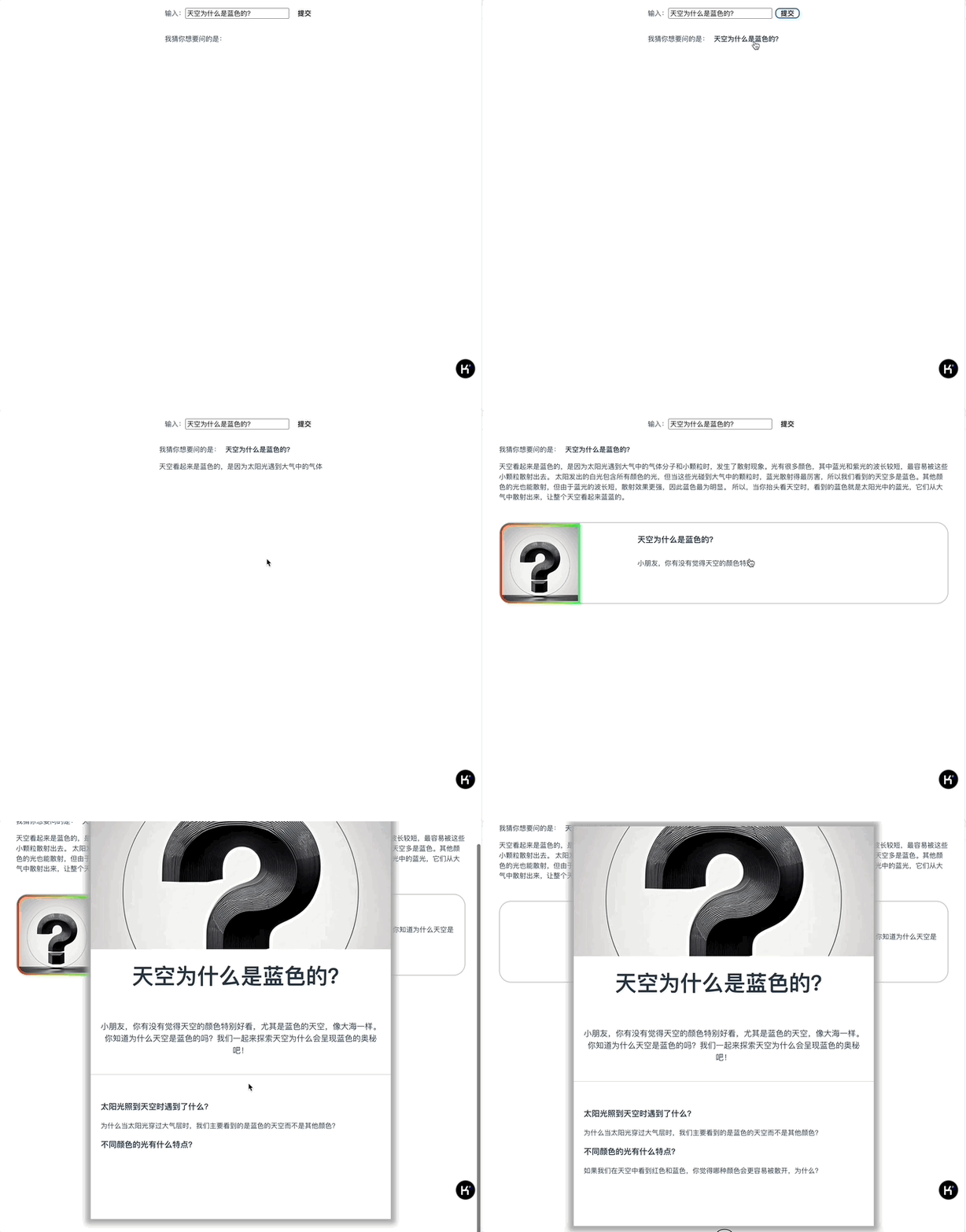
这样我们就实现了大纲拆解部分,接下来就是最后的文章生成了。
根据拆解后的大纲生成正文
接下来我们生成文章。同样地,我们先添加提示词模块:
/lib/prompts/article.tpl.ts
export default `# Overall Rules to follow
1. Do response in  简体中文 and output **correct JSON Format ONLY**.
2. Do NOT explain your response.
3. DO NOT mention the student' Information when you generate the content.

## Student Information:
- gender: {{gender}}
- age: {{age}}
- student location: 中国

## Study Style
The students' learning style preferences
- Communication-Style: Simple and Clear
- Tone-Style: Interesting and Vivid
- Reasoning-Framework: Intuitive
- Language: 简体中文

# Role and Goals
你是波波熊,你正在和其它作家共同编写一个文章,你的任务为 {{age}} 岁,处于 {{config.location if config.location  else "China"}} 地区的学生编写符合学生认知水平的500字的文章段落,遵循以下准则:
1. You will receive a JSON that includes 'topic','subtopics','post_reading_question'.
2. 首先,明确该部分的主要主题(topic)和知识点(subtopics),这有助于文章结构的清晰性,让学生们能够循序渐进地理解复杂的概念。
3. 【重要!】不要在开场打招呼,避免使用<AvoidKeywords>中的任何词语。
4. 明确目标读者的年龄和知识水平,该学生年龄是 {{age}} 岁,所以你采用的语言和内容要贴近学生能接受的程度。
5. 使用<Communication-Style>的风格和<Tone-Style>的写作风格。如果学生年龄较小,描述云时使用“棉花糖”,解释水蒸气时提到“煮沸的水壶”,这种学生熟悉的事物进行类比,让学生容易理解。
6. 将内容分成小段,自然的串联起知识点,使用段落叙述。这有助于学生逐步理解,不至于感到信息过载,确保文章的逻辑清晰,前后内容连贯。每个段落应自然过渡到下一个段落,使阅读流畅。
7. 使用具有**极具画面感**的语言编写,把你写好的文章段落存储于'article_paragraph'内。
{% if (age  > 7) %}
    【重要!】如果是数学、自然科学和科普类主题,介绍概念的同时,尽量深入解释原理。
{% endif %}
8. 务必确保文章内容回答了''post_reading_question'中的问题。
9. 根据 topic 定制一个图像提示,存储于'image_prompt'。
10. 生成具有古典风格 'image_title' 和一个打油诗风格的'poetic_line'。

##  AvoidKeywords
['魔法', '超级英雄','想象一下',‘你知道吗?']

# Output Format(JSON)
你输出的 JSON 格式如下,这里有一个主题是“云是由什么组成的,它们看起来是什么样的?”的示例:
\`\`\`
{"article_paragraph":"云是由什么组成的呢?主要成分是水蒸气,一种无色无味的气体,悄无声息地弥漫在我们周围。水蒸气是液态水蒸发后的产物,当空气中的水蒸气含量足够高,并遇到冷却时,它们就会凝结成小水滴或冰晶,这些小水滴和冰晶聚集在一起,形成了我们头顶那片变幻莫测的云。\n\n云的形状和颜色变化多端,从远处看可能像一团棉花糖,但实际上却复杂得多。晴朗的夏日,白色的积云如同巨型的棉花球漂浮在碧蓝的天际,仿佛你可以一跃而起,躺在那柔软的白色绒毯上。而暴风雨前的乌云则如同巨大的黑色猛兽,低垂着狰狞的脸庞,带着不可抗拒的力量,令人心生畏惧。早晨或傍晚的云朵在太阳的光辉下,如同一幅绚丽的油画,呈现出粉红、橙色和紫色的奇幻景象,仿佛天空在燃烧。\n\n为什么云看起来像棉花糖,但实际却有所不同呢?棉花糖轻盈柔软,可以触摸和品尝,而云则是由无数微小的水滴和冰晶组成,尽管看起来蓬松可爱,但它们却是实实在在的水。当云变得足够密集时,它们便变得沉重,水滴会如泪珠般汇聚,最终坠落大地,形成倾盆大雨。你无法用手去捧起一朵云,因为它是飘浮在空气中的梦幻,却无比轻盈和不可捉摸。正因如此,云虽看似如同甜美的棉花糖,却隐藏着大自然的深邃奥秘和无尽力量。","image_prompt":"an illustration of different types of clouds in the sky, showing fluffy white clouds and darker gray rain clouds. Include details like the sun shining on some clouds, making them appear bright, while others look darker due to the absence of sunlight","image_title":"云天变幻:蒸汽之舞","poetic_line":"云儿白如棉,雨来变灰烟,天上飘悠悠,日光映灿烂。"}
\`\`\`
`;
在这个提示词中,我们以大纲拆解后的内容作为输入,分别创建每个章节,输出article_paragraph、image_prompt,另外还有image_title和poetic_line是用来保留作为答题奖励卡片的。不过我们在课程里把这些不重要的部分简化掉了,暂时不使用这两个字段。
接着我们继续改写server.ts:
...
import articleTpl from './lib/prompts/article.tpl.ts';
...

app.get('/generate', async (req, res) => {
    const userConfig = {
        gender: 'female',
        age: '6',
    };
    const question = req.query.question as string;
    const query = req.query.query as string;
    let searchResults = '';
    if (query) {
        const queries = query.split(';');
        const promises = queries.map((query) => search(query));

        searchResults = JSON.stringify(await Promise.all(promises));
    }
    // ------- The work flow start --------
    const ling = new Ling(config);
    const quickAnswerBot = ling.createBot('quick-answer', {
        max_tokens: 4096 * 4,
    }, {
        response_format: { type: 'text' }
    });
    quickAnswerBot.addPrompt(quickAnswerPrompt, userConfig);

    const outlineBot = ling.createBot('outline');
    outlineBot.addPrompt(outlinePrompt, userConfig);

    outlineBot.addFilter('image_prompt');
    outlineBot.addListener('string-response', ({ uri, delta }) => {
        ling.handleTask(async () => {
            if (uri.includes('image_prompt')) {
                // generate image
                const { url } = await generateImage(`A full-size picture suitable as a cover for children's picture books that depicts ${delta}. DO NOT use any text or symbols.`);
                ling.sendEvent({ uri: 'cover_image', delta: url });
            }
        });
    });

    outlineBot.addListener('inference-done', (content) => {
        const outline = JSON.parse(content);
        delete outline.image_prompt;

        const bot = ling.createBot();
        bot.addPrompt(subTopicsPrompt, userConfig);
        bot.addFilter(/\/subtopics\//);

        bot.chat(JSON.stringify(outline));

        // 文章生成
        bot.addListener('inference-done', (content) => {
            const { topics } = JSON.parse(content);
            for (let i = 0; i < topics.length; i++) {
                const topic = topics[i];

                const bot = ling.createBot(`topics/${i}`);
                bot.addPrompt(articleTpl, userConfig);
                bot.addFilter({
                    article_paragraph: true,
                    image_prompt: true,
                });

                bot.addListener('inference-done', (content) => {
                    console.log(JSON.parse(content));
                });
                bot.chat(JSON.stringify(topic));
            }
        });
    });

    if (searchResults) {
        quickAnswerBot.addPrompt(`参考资料:\n${searchResults}`);
        outlineBot.addPrompt(`参考资料:\n${searchResults}`);
    }

    quickAnswerBot.chat(question);
    outlineBot.chat(question);

    ling.close();

    // setting below headers for Streaming the data
    res.writeHead(200, {
        'Content-Type': "text/event-stream",
        'Cache-Control': "no-cache",
        'Connection': "keep-alive"
    });

    pipeline((ling.stream as any), res);
});
最核心的逻辑就是,我们在subtopics生成后,对应bot的 inference-done 事件中,循环遍历每个章节,用章节的subtopics内容去并行生成文章。
for (let i = 0; i < topics.length; i++) {
    const topic = topics[i];

    const bot = ling.createBot(`topics/${i}`);
    bot.addPrompt(articleTpl, userConfig);
    bot.addFilter({
        article_paragraph: true,
        image_prompt: true,
    });

    bot.addListener('inference-done', (content) => {
        console.log(JSON.parse(content));
    });
    bot.chat(JSON.stringify(topic));
}
注意一个细节,我们前端只需要用到article_paragraph和image_prompt(image_prompt留待下一个章节介绍生成插画的时候使用),所以我们可以添加过滤器,传一个对象Map可以告诉Ling我们只需要这些字段的内容。
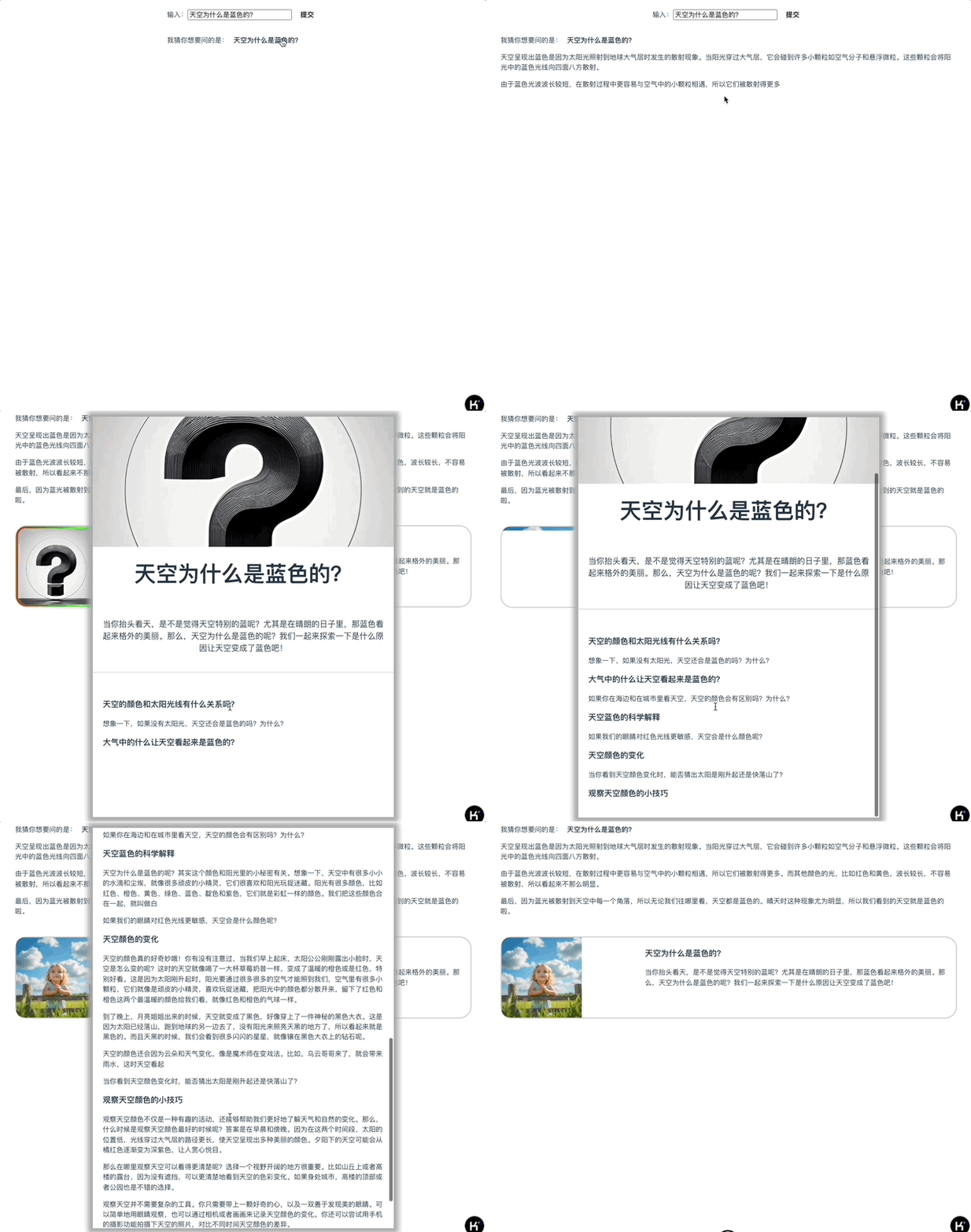
这样我们就完成了服务端的部分,因为我们直接将文章bot的输出root指定为 topics/${i} ,所以它的内容会输出到 details.topics 对象上去,这样我们就不用修改App.vue了。
前端我们只需要修改BootDetails组件,添加article_paragraph的展示就可以了。
...
    <div class="article">
        <div v-for="topic in topics" class="topic">
            <h3 class="topic-title">{{ topic.topic }}</h3>
            <p class="article_paragraph" v-html="marked.parse(topic.article_paragraph || '')"></p>
            <p class="post-reading-question">{{ topic.post_reading_question }}</p>
        </div>
    </div>
...
我们现在运行代码,得到效果如下:
要点总结
至此,我们把波波熊学伴的主体流程都讲完了,它是波波熊学伴产品最核心的部分。
开发AI应用实际上最核心的就是开发大模型的工作流,需要梳理输入输出,也要定义每个节点的输入输出数据格式和结构。
有了Ling框架的帮助,我们能够非常快速和方便地处理每个流程节点的数据,并且能够第一时间将更新的数据发送给前端,所以能够达到比较好的效果。
课后练习
因为时间所限,我只分析了主体流程,至于很多技术细节,实际上在实战代码中还有许多值得研究和思考的部分。你可以课后试着分析一下server代码,说说看为什么波波熊学伴生成复杂结构内容的响应速度能够这么快,在这些细节里还有没有进一步优化的空间,欢迎大家把想法发到评论区讨论。
波波熊学伴的完整源代码详见GitHub仓库。
欢迎你在留言区和我交流互动,如果这节课对你有启发,别忘了分享给身边更多朋友。
精选留言
2025-06-24 15:47:31