你好,我是月影。
在上一节课,我们通过两个实践例子,详细讲解了使用动态JSON解析来解决大模型流式输出JSON数据的问题。
但是我们还遗留了一个非常重要的问题,那就是我们的 JSONParser 模块,具体是怎么实现的。
今天我们就来深入学习一下它的实现原理,这样既能让你知其所以然,也能让你的程序设计基础更加扎实。
解析器与状态机
JSONParser本质上仍然是一个标准的JSON语言解析器。解析器(Parser)的作用是把一串字符串(在这里是JSON代码)转化为可被程序使用的数据对象。大多数编程语言的解析器,都包含一个或多个解析环节。这里我们的目标相对简单,只需要对JSON格式进行解析。
实现经典的语言解析器,通常采用状态机(state machine)来进行词法和语法分析。这是因为,在形式语言理论中,对应于正则文法的识别器是有限状态自动机(finite automaton),而对应于上下文无关文法的识别器是带栈自动机(pushdown automaton)。
包括JSON语法在内(事实上JSON属于比较简单的语法)的一般性编程语言,大多数是完全或近似的上下文无关语言,它们的词法部分可以用正则表达式来描述,对应的自动机就是有限状态机,而语法部分可以由上下文无关文法或其子集来描述,解析器就可以通过带栈的状态机来识别。
我们的JSON解析器实现,整体就是一个手写的基于状态机词法解析(lexer)加上带栈自动机的手写JSON解析器,它通过一个大分发函数trace(input: string),按照当前状态分类处理输入字符,最终解析完成后触发相应的事件。
我们详细来看一下其中的关键部分。
状态机的定义:LexerStates
首先我们定义确定状态机。
const enum LexerStates {
    Begin = 'Begin',
    Object = 'Object',
    Array = 'Array',
    Key = 'Key',
    Value = 'Value',
    String = 'String',
    Number = 'Number',
    Boolean = 'Boolean',
    Null = 'Null',
    Finish = 'Finish',
    Breaker = 'Breaker',
}
这上面的枚举值就是解析JSON过程中可能出现的各种状态。
JSON本质上是一套固定的语法,最外层只能是对象 {...} 或数组 [...] 。补充说明一下,严格来说还有单独的数字、布尔、null、字符串也可以构成合法JSON,但这些输出对于大模型来说不属于JSON输出,所以这里我们不予考虑。
我们首先用一个数组stateStack作为堆栈来保存当前所处的状态层级,最初是[Begin]。随着读入字符的不同,堆栈内的状态会在上面枚举的这些状态中发生变化。
可变化的状态分别如下:
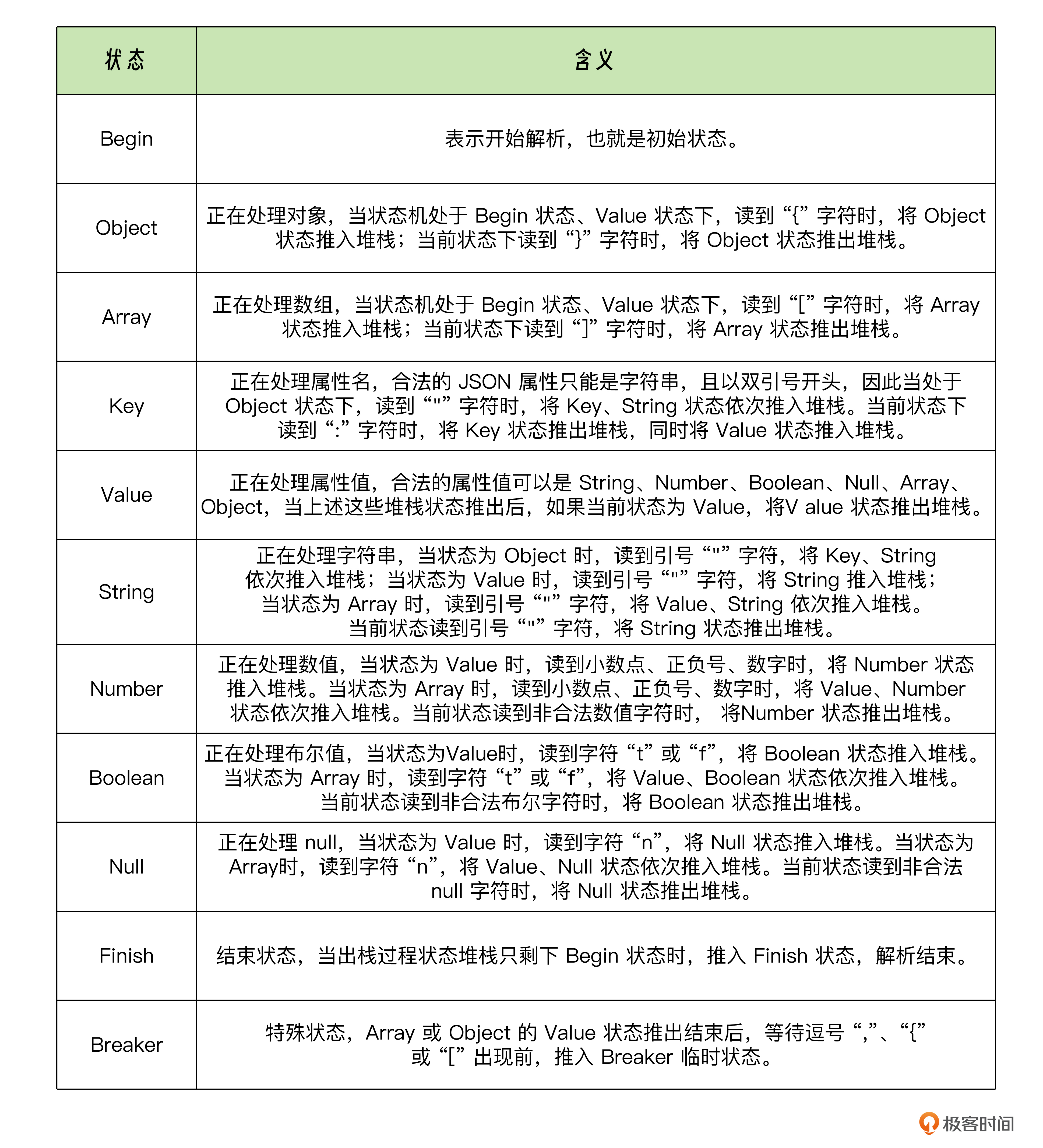
基本上解析器主体逻辑就是由上面描述的状态机控制了,接下来我们看具体定义。
JSONParser 类的属性和构造
export class JSONParser extends EventEmitter {
    private content: string[] = [];
    private stateStack: LexerStates[] = [LexerStates.Begin];
    private currentToken = '';
    private keyPath: string[] = [];
    private arrayIndexStack: any[] = [];
    private autoFix = false;
    private debug = false;
    private lastPopStateToken: { state: LexerStates, token: string } | null = null;

    constructor(options: { autoFix?: boolean, parentPath?: string | null, debug?: boolean } = { autoFix: false, parentPath: null, debug: false }) {
        super();
        this.autoFix = !!options.autoFix;
        this.debug = !!options.debug;
        if (options.parentPath) this.keyPath.push(options.parentPath);
    }

    // ...
}
JSONParser类继承EventEmitter,这样它可以在解析中边读边触发事件,每当数据更新时,就可以立即通知外部处理。
以下是JSONParser类几个属性的作用:
1.content: string[]
用于把所有已读入的字符按顺序存起来,比如 ["{", "\"", "n", "a", "m", "e", "\"", ":"] 等等。后续可能会拼成完整字符串做 new Function(...) 的执行,或者做报错时的上下文提示。
2.stateStack: LexerStates[]
用一个数组来模拟“栈”结构,最后一个元素就是当前的状态。因为 JSON 解析会嵌套,比如对 { ... } 里面还可以继续 parse 对象或数组,这里就需要入栈、出栈来表示进入、退出某个嵌套。
3.currentToken: string
当我们进入 String 状态时,就要把字符一个个追加到 currentToken。当解析完这个字符串后,才会把它清空,再去解析下一个值。
4.keyPath: string[]
用来记录我们在对象嵌套层级中,当前正在解析的字段路径,比如解析到 { user: { address: { city: 'xxx' }}},你可能会有类似 ['user', 'address', 'city'] 这样的路径信息。
- arrayIndexStack: any[]
如果遇到数组 [ ... ],我们在解析第几个元素?一个数组里还可以套数组,所以用栈来记录不同层级的下标。
6.autoFix和debug
-
autoFix:表示当解析遇到错误时,是否尝试帮我们做一些常见错误(比如引号不匹配、缺少逗号等)的修正。 -
debug:用于在解析过程打印日志方便调试,不需要发布到生产时可以关闭。
7.在构造函数 constructor(...) 里,除了初始化这些属性,还会把 options.parentPath 放到 keyPath 里,这样解析可以有一个“上层路径”的概念。
关键的栈操作
接下来我们定义几个和状态栈相关的操作。
首先是入栈方法:
private pushState(state: LexerStates) {
    this.log('pushState', state);
    this.stateStack.push(state);
    if (state === LexerStates.Array) {
        this.arrayIndexStack.push({ index: 0 });
    }
}
进入一个新的状态时,就调用这个函数。比如当我们识别到 {,就要 pushState(LexerStates.Object)。
其次是出栈方法:
private popState() {
    this.lastPopStateToken = { state: this.currentState, token: this.currentToken };
    this.currentToken = '';
    const state = this.stateStack.pop();
    this.log('popState', state, this.currentState);
    if (state === LexerStates.Value) {
        this.keyPath.pop();
    }
    if (state === LexerStates.Array) {
        this.arrayIndexStack.pop();
    }
    return state;
}
当确定某个状态解析完毕,要退出这个状态时,就弹栈。
这里我把 this.lastPopStateToken 存起来,方便我们知道“我们刚刚退的是什么状态”,为后续自动修复或报错提示时使用。
然后是堆栈整理:
private reduceState() {
    const currentState = this.currentState;
    if (currentState === LexerStates.Breaker) {
        this.popState();
        if (this.currentState === LexerStates.Value) {
            this.popState();
        }
    } else if (currentState === LexerStates.String) {
        const str = this.currentToken;
        this.popState();
        if (this.currentState === LexerStates.Key) {
            this.keyPath.push(str);
        } else if (this.currentState === LexerStates.Value) {
            this.emit('string-resolve', {
                uri: this.keyPath.join('/'),
                delta: str,
            });
            // this.popState();
        }
    } else if (currentState === LexerStates.Number) {
        const num = Number(this.currentToken);
        this.popState();
        if (this.currentState === LexerStates.Value) {
            // ...
            this.emit('data', {
                uri: this.keyPath.join('/'), // JSONURI https://github.com/aligay/jsonuri
                delta: num,
            });
            this.popState();
        }
    } else if (currentState === LexerStates.Boolean) {
        const str = this.currentToken;
        this.popState();
        if (this.currentState === LexerStates.Value) {
            this.emit('data', {
                uri: this.keyPath.join('/'),
                delta: isTrue(str),
            });
            this.popState();
        }
    } else if (currentState === LexerStates.Null) {
        this.popState();
        if (this.currentState === LexerStates.Value) {
            this.emit('data', {
                uri: this.keyPath.join('/'),
                delta: null,
            });
            this.popState();
        }
    } else if (currentState === LexerStates.Array || currentState === LexerStates.Object) {
        this.popState();
        if (this.currentState === LexerStates.Begin) {
            this.popState();
            this.pushState(LexerStates.Finish);
            const data = (new Function(`return ${this.content.join('')}`))();
            this.emit('finish', data);
        } else if (this.currentState === LexerStates.Value) {
            // this.popState();
            this.pushState(LexerStates.Breaker);
        }
    }
    else {
        this.traceError(this.content.join(''));
    }
}
当检测到某个状态对应的结构已经完整读完,就调用reduceState函数做一些收尾操作。
-
比如如果当前状态是
String,说明字符串结束;如果上一个状态是Key,那就意味着我们刚拿到“键”,把它加进keyPath;如果上一个状态是Value,就把刚刚的字符串当成“值”发射一个事件,然后看看下一步是要Breaker还是别的状态。 -
如果当前状态是
Object或Array并且结束了}或],则有可能还要退栈到外层,如果外层都没有了,就意味着整个 JSON 解析完成,再通过this.emit('finish', data)通知外部。
此外,我们还有几个和堆栈有关的状态读写器。它们分别可以读取当前堆栈状态、堆栈中的上一个状态(即进入当前状态的前一个状态)以及当前数组的下标(当前如果正在解析数据,可以拿到已解析数组元素的个数,生成jsonuri的uri路径需要使用)。
get currentState() {
    return this.stateStack[this.stateStack.length - 1];
}

get lastState() {
    return this.stateStack[this.stateStack.length - 2];
}

get arrayIndex() {
    return this.arrayIndexStack[this.arrayIndexStack.length - 1];
}
解析流程核心
接下来,最核心的方法就是 trace(input: string) 。
public trace(input: string) {
    const currentState = this.currentState;
    this.log('trace', JSON.stringify(input), currentState, JSON.stringify(this.currentToken));

    const inputArray = [...input];
    if (inputArray.length > 1) {
        inputArray.forEach((char) => {
            this.trace(char);
        });
        return;
    }

    this.content.push(input);
    if (currentState === LexerStates.Begin) {
        this.traceBegin(input);
    }
    else if (currentState === LexerStates.Object) {
        this.traceObject(input);
    }
    else if (currentState === LexerStates.String) {
        this.traceString(input);
    }
    else if (currentState === LexerStates.Key) {
        this.traceKey(input);
    }
    else if (currentState === LexerStates.Value) {
        this.traceValue(input);
    }
    else if (currentState === LexerStates.Number) {
        this.traceNumber(input);
    }
    else if (currentState === LexerStates.Boolean) {
        this.traceBoolean(input);
    }
    else if (currentState === LexerStates.Null) {
        this.traceNull(input);
    }
    else if (currentState === LexerStates.Array) {
        this.traceArray(input);
    }
    else if (currentState === LexerStates.Breaker) {
        this.traceBreaker(input);
    }
    else if (!isWhiteSpace(input)) {
        this.traceError(input);
    }
}
在JSONParser类里,trace 函数是对外暴露的解析入口,每次调用 trace('某些字符'),解析器就会把这些字符一个个“吃进来”,根据当前状态做处理。
它支持一次只给一个字符,或者一次给一串字符。如果是一串,就会拆分成单字符循环处理。
拆分后根据当前状态将字符分发给对应的处理器:
if (currentState === LexerStates.Begin) {
    this.traceBegin(input);
}
else if (currentState === LexerStates.Object) {
    this.traceObject(input);
}
else if (currentState === LexerStates.String) {
    this.traceString(input);
}
// ...
else if (!isWhiteSpace(input)) {
    this.traceError(input);
}
可以看到这是一个大分发逻辑:先看目前在哪个状态,然后把当前字符交给对应的“子函数”来处理,比如 traceObject、traceString、traceNumber 等等。
如果既不在任何已知状态,也不是空白字符,就当作错误处理 traceError。
这些子函数根据当前状态对字符分别处理,其中很多细节就不一一列举了,这里仅举一个例子,详细代码有兴趣的同学可以查看 JSONParser,做深入了解。
private traceObject(input: string) {
    if (isWhiteSpace(input) || input === ',') {
        return;
    }
    if (input === '"') {
        this.pushState(LexerStates.Key);
        this.pushState(LexerStates.String);
    } else if (input === '}') {
        this.reduceState();
    } else {
        this.traceError(input);
    }
}
前面这段代码是一个状态处理子函数,当堆栈状态为Object时,trace将字符分发给traceObject进行处理。
它的逻辑是这样的。如果当前在 Object 状态下,接下来的字符可以是:
-
空白符,我们就忽略。
-
逗号,在 JSON 里有可能出现这种情况:
{ "key1": "val1", "key2": "val2" },分隔多个键值对,但是要注意位置是否合法。 -
双引号,那就表示要读取一个“Key”,所以
pushState(LexerStates.Key) -> pushState(LexerStates.String)开始解析字符串键。 -
右花括号
},表示这个对象结束。那就要调用this.reduceState(),退栈或做收尾处理。 -
其他情况都不符合标准 JSON,进入
traceError看是否能修复或报错。
错误自动修复
由于大模型输出JSON数据有时候会有瑕疵,比如多了或者少了一些格式字符,所以我们在解析器执行过程中,如果读取了当前状态下非法的字符,可以按照一些规则进行错误修复。
错误修复逻辑定义在 traceError(input: string) 函数里。
private traceError(input: string) {
    // console.error('Invalid Token', input);
    this.content.pop();
    if (this.autoFix) {
        if (this.currentState === LexerStates.Begin || this.currentState === LexerStates.Finish) {
            return;
        }
        if (this.currentState === LexerStates.Breaker) {
            if (this.lastPopStateToken?.state === LexerStates.String) {
                // 修复 token 引号转义
                const lastPopStateToken = this.lastPopStateToken.token;
                this.stateStack[this.stateStack.length - 1] = LexerStates.String;
                this.currentToken = lastPopStateToken || '';
                let traceToken = '';
                for (let i = this.content.length - 1; i >= 0; i--) {
                    if (this.content[i].trim()) {
                        this.content.pop();
                        traceToken = '\\\"' + traceToken;
                        break;
                    }
                    traceToken = this.content.pop() + traceToken;
                }
                this.trace(traceToken + input);
                return;
            }
        }
        if (this.currentState === LexerStates.String) {
            // 回车的转义
            if (input === '\n') {
                if (this.lastState === LexerStates.Value) {
                    const currentToken = this.currentToken.trimEnd();
                    if (currentToken.endsWith(',') || currentToken.endsWith(']') || currentToken.endsWith('}')) {
                        // 这种情况下是丢失了最后一个引号
                        for (let i = this.content.length - 1; i >= 0; i--) {
                            if (this.content[i].trim()) {
                                break;
                            }
                            this.content.pop();
                        }
                        const token = this.content.pop() as string;
                        // console.log('retrace -> ', '"' + token + input);
                        this.trace('"' + token + input);
                        // 这种情况下多发送(emit)出去了一个特殊字符,前端需要修复,发送一个消息让前端能够修复
                        this.emit('data', {
                            uri: this.keyPath.join('/'),
                            delta: '',
                            error: {
                                token,
                            },
                        });
                    } else {
                        // this.currentToken += '\\n';
                        // this.content.push('\\n');
                        this.trace('\\n');
                    }
                }
                return;
            }
        }
        if (this.currentState === LexerStates.Key) {
            if (input !== '"') {
                // 处理多余的左引号 eg. {""name": "bearbobo"}
                if (this.lastPopStateToken?.token === '') {
                    this.content.pop();
                    this.content.push(input);
                    this.pushState(LexerStates.String);
                }
            }
            // key 的引号后面还有多余内容,忽略掉
            return;
        }

        if (this.currentState === LexerStates.Value) {
            if (input === ',' || input === '}' || input === ']') {
                // value 丢失了
                this.pushState(LexerStates.Null);
                this.currentToken = '';
                this.content.push('null');
                this.reduceState();
                if (input !== ',') {
                    this.trace(input);
                } else {
                    this.content.push(input);
                }
            } else {
                // 字符串少了左引号
                this.pushState(LexerStates.String);
                this.currentToken = '';
                this.content.push('"');
                // 不处理 Value 的引号情况,因为前端修复更简单
                // if(!isQuotationMark(input)) {
                this.trace(input);
                // }
            }
            return;
        }

        if (this.currentState === LexerStates.Object) {
            // 直接缺少了 key
            if (input === ':') {
                this.pushState(LexerStates.Key);
                this.pushState(LexerStates.String);
                this.currentToken = '';
                this.content.push('"');
                this.trace(input);
                return;
            }
            // 一般是key少了左引号
            this.pushState(LexerStates.Key);
            this.pushState(LexerStates.String);
            this.currentToken = '';
            this.content.push('"');
            if (!isQuotationMark(input)) {
                // 单引号和中文引号
                this.trace(input);
            }
            return;
        }

        if (this.currentState === LexerStates.Number || this.currentState === LexerStates.Boolean || this.currentState === LexerStates.Null) {
            // number, boolean 和 null 失败
            const currentToken = this.currentToken;
            this.stateStack.pop();
            this.currentToken = '';
            // this.currentToken = '';
            for (let i = 0; i < [...currentToken].length; i++) {
                this.content.pop();
            }
            // console.log('retrace', '"' + this.currentToken + input);

            this.trace('"' + currentToken + input);
            return;
        }
    }
    // console.log('Invalid Token', input, this.currentToken, this.currentState, this.lastState, this.lastPopStateToken);
    throw new Error('Invalid Token');
}
如果 autoFix === true,它会试图做一些常见错误的修复,例如:
-
如果你在对象键上使用了中文引号或单引号,这里就会把它换成标准的英文
"。 -
如果解析到一半时发现缺了一些字符,也会尽量帮你加上
null或补足一个右引号等等。 -
如果实在无法修复,就
throw new Error('Invalid Token')。
至此,我们JSONParser的大体逻辑就梳理完了,剩下的一些细节,你可以自己尝试复制、修改、运行代码,给出不同的输入,看看它的结果。
要点总结
这节课讲了JSONParser的具体实现,它的核心功能是一个支持动态字符输入的JSON语法解析器,能够做到边输入字符边解析。这样就能实现大模型流式输入的同时,解析JSON字符串的需求,这对于构建及时响应的AI应用非常重要。
我来带你回顾一下今天比较重要几个内容。
首先是状态机。我们为什么要给JSON定义这么多状态,而不是直接正则匹配一大串字符?因为 JSON 结构具有嵌套、递归特性,用状态机+栈可以清晰地表示进入和退出不同层级。
如果你想学习更深入的编译器原理,会发现它也使用类似思路——先词法分析(拆分 token),再语法分析(构建语法树)。这里我们把这两步简化地糅合在一起,用“逐字符”的方式处理。
然后是事件驱动。继承 EventEmitter 可以让解析过程“边读边通知”,不一定要等到整个 JSON 读完才输出结果。这对于我们这种实时处理数据流的场景非常实用。
最后还有自动修复。标准 JSON 比较严格,但实际很多场景里会出现不标准的JSON,所以AI推理的时候,也可能会输出错误的不标准的JSON数据,需要进行修复。当解析错误时,并不一定要马上报错,我们可以试着“猜测”或者“补齐”缺失部分。
最后我想说明一下,这节课的内容会比较偏底层,有许多技术细节,可能对部分同学来说理解起来会偏难,尤其是不懂编译原理的同学。
但是不要紧,JSON本身不是非常复杂的语言,所以整体代码的逻辑也没有那么复杂。最好的学习方法就是动手实践,只要你坚持不断地练习和跟踪代码执行,相信你一定能把这一共不到六百行的代码完全吃透。
课后练习
JSONParser是一个手写的JSON解析器,它的思路与规范的LL(1)解析器类似,但它不完全采用经典的LL(1)实现,而是手写状态机,将状态跟踪转换逻辑拆分,这样的好处是便于维护。
如果你学过编译原理,你可以尝试用LL(1)的思路,用文法生成工具来生成标准的JSON解析器,再将它改造成可以动态接受字符实时解析,可以做出一个更加规范的JSONParser。
你可以动手试一下,并将你的心得分享到评论区。
精选留言
2025-05-15 18:24:40